
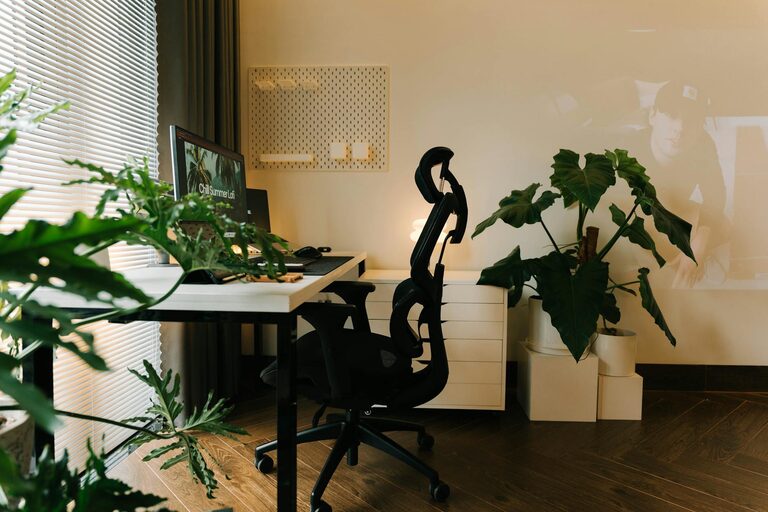
Creating a workspace at home that is both cozy and productive is essential for anyone spending significant time working remotely. The right setup can help you focus, reduce stress, and even improve your creativity. Whether you have a dedicated room or just a small corner, here are practical tips to build a home workspace that supports your well-being and work goals.
Choose the Right Location
Find a Quiet Spot
Look for a place in your home that has minimal distractions and noise. A quiet corner, a spare room, or an area away from everyday household traffic is ideal. This helps your brain associate the space with focus and productivity.
Consider Natural Light
Natural light boosts mood and energy levels. Position your desk near a window if possible. If natural light is limited, choose bright, warm artificial lighting to keep your workspace inviting.
Invest in Comfortable Furniture
Select an Ergonomic Chair
A good chair supports your posture, reduces fatigue, and prevents back pain. Look for adjustable features such as height, lumbar support, and armrests.
Choose a Desk at the Right Height
Your desk should allow your arms to rest comfortably at a 90-degree angle when typing. Adjustable desks or standing desk options can add flexibility and comfort throughout your workday.
Organize for Efficiency
Declutter Regularly
Keep only the essentials on your desk. A clean and tidy space minimizes distractions, helping you stay focused.
Use Storage Solutions
Drawers, shelves, and organizers keep paperwork and supplies in order. Group items by category for quick access.
Cable Management
Tidy up cords with clips or sleeves. This not only looks better but also prevents tangling and accidents.
Add Personal and Cozy Touches
Incorporate Plants
Plants improve air quality and add a calming, natural element to your workspace. Small succulents or low-maintenance plants work well for desk areas.
Use Soft Textures
Add a comfortable rug, cushions, or a cozy throw to soften the space. These details make your workspace feel inviting and less clinical.
Let Your Personality Shine
Include photos, artwork, or objects that inspire you. Personal touches boost morale and make your workspace truly yours.
Create a Functional Layout
Keep Essentials Within Reach
Place frequently used items like your computer, notebook, and pens close by. This reduces interruptions and keeps you in the flow of work.
Allow Space for Movement
If possible, arrange your furniture to leave room to stretch or stand briefly. Moving occasionally helps maintain comfort and focus.
Use Technology Wisely
Invest in Quality Equipment
A reliable computer, a good-quality monitor, and a fast internet connection make for smoother work sessions.
Utilize Productivity Tools
Apps for task management, time tracking, and note-taking can keep you organized and help manage your workload effectively.
Manage Notifications
Customize your device settings to limit distractions during work hours. Use “Do Not Disturb” modes or schedule breaks for checking messages.
Set Boundaries and Routines
Establish Work Hours
Designate specific work times and stick to them. This discipline helps separate work from personal life even within the same space.
Take Regular Breaks
Short breaks improve focus and reduce fatigue. Use techniques like the Pomodoro method (25 minutes work, 5 minutes break) to structure your day.
Communicate Your Space’s Purpose
If you share your home, let others know your working hours and the importance of respecting your workspace.
Maintain Good Air Quality and Comfort
Ventilate Regularly
Fresh air reduces stuffiness and keeps you alert. Open windows when possible or use an air purifier.
Control Temperature
Make sure your workspace is comfortably warm or cool. Adjust heating, cooling, or add a desk fan as needed.
—
By thoughtfully designing your home workspace with comfort and productivity in mind, you create an environment that supports successful workdays and overall well-being. With these tips, your home office can become a place you look forward to spending time in every day.
About the Author